Version 0.7.0 is out. It’s mostly about the people you play with: you can now keep a friends list, ignore anyone who’s bothering you, and report a player in a window made for it. There’s also a better help window, a quicker way to pick things up, and a lot of the game’s text rewritten. Get it from the download page, or play it in your browser, which is always up to date.
Friends, and the Social window
Type /friend <name> to add someone to your friends list, and /unfriend <name> to take them off. When a friend logs in or out, you’re told: “Bob has logged in.”
Friends are one-way. You don’t need to ask, and they aren’t told when you add them or take them off. A friend is that one character, not every character the player has. Your list holds up to 100, and it’s the same whichever of your characters you’re playing.
Press F to open the new Social window, which has four tabs:
| Tab | |
|---|---|
| Friends | Your friends list, with those playing at the top. |
| Online | Everyone playing, and where they are. |
| Recent | The last 20 players whose chat reached you, newest first. Handy for someone whose name you can’t spell, or who’s already logged off. It’s forgotten when you log out. |
| Ignored | Who you’re ignoring (below). |
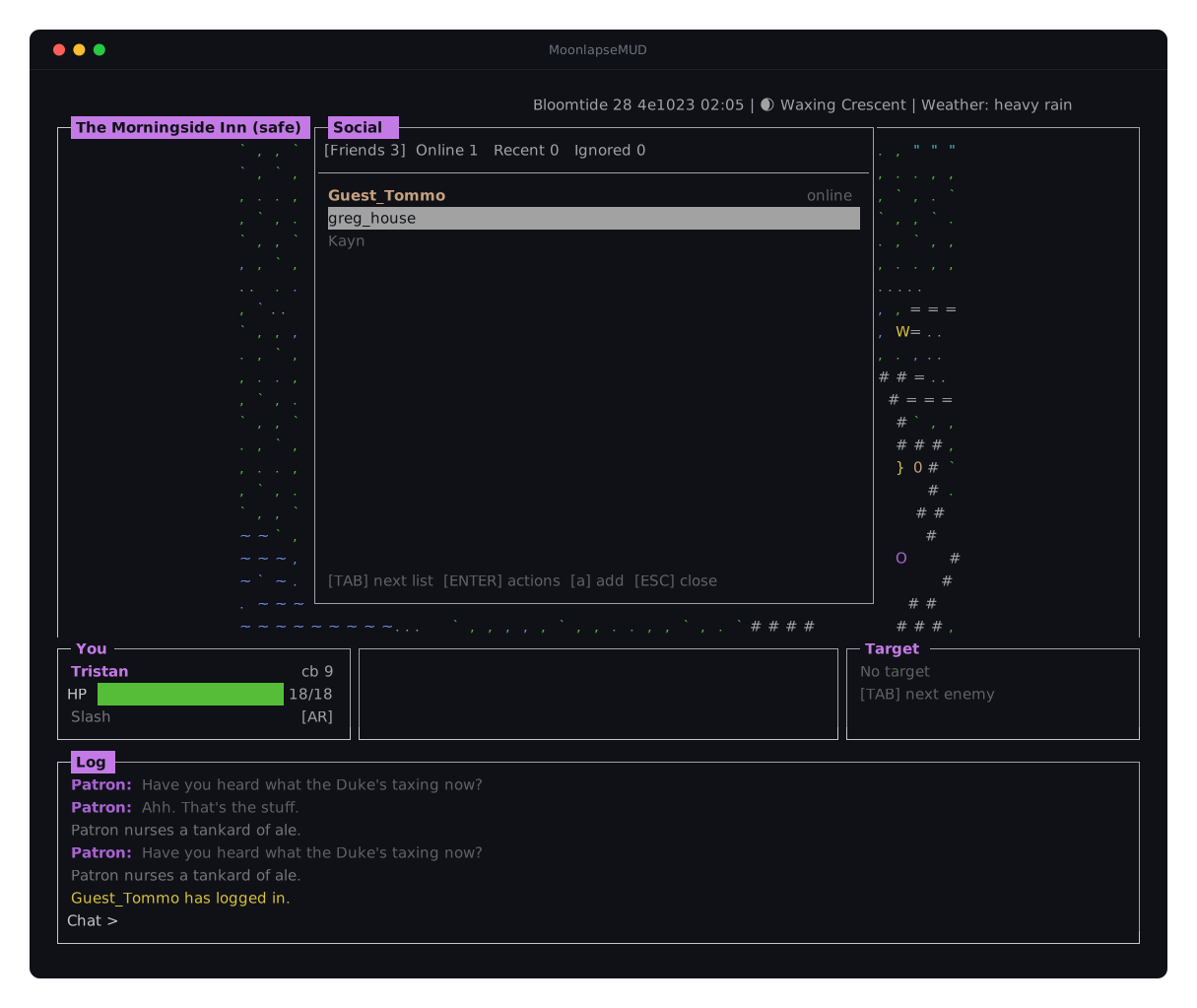
/friends, /who and /ignorelist open the same window, each on its own tab.
Friends now stand out on the map, in the nearby list and in your target, and anyone you’re ignoring is greyed out. Your party members, and anyone you can fight, keep their colours.
Everything you can do with a player, in one menu
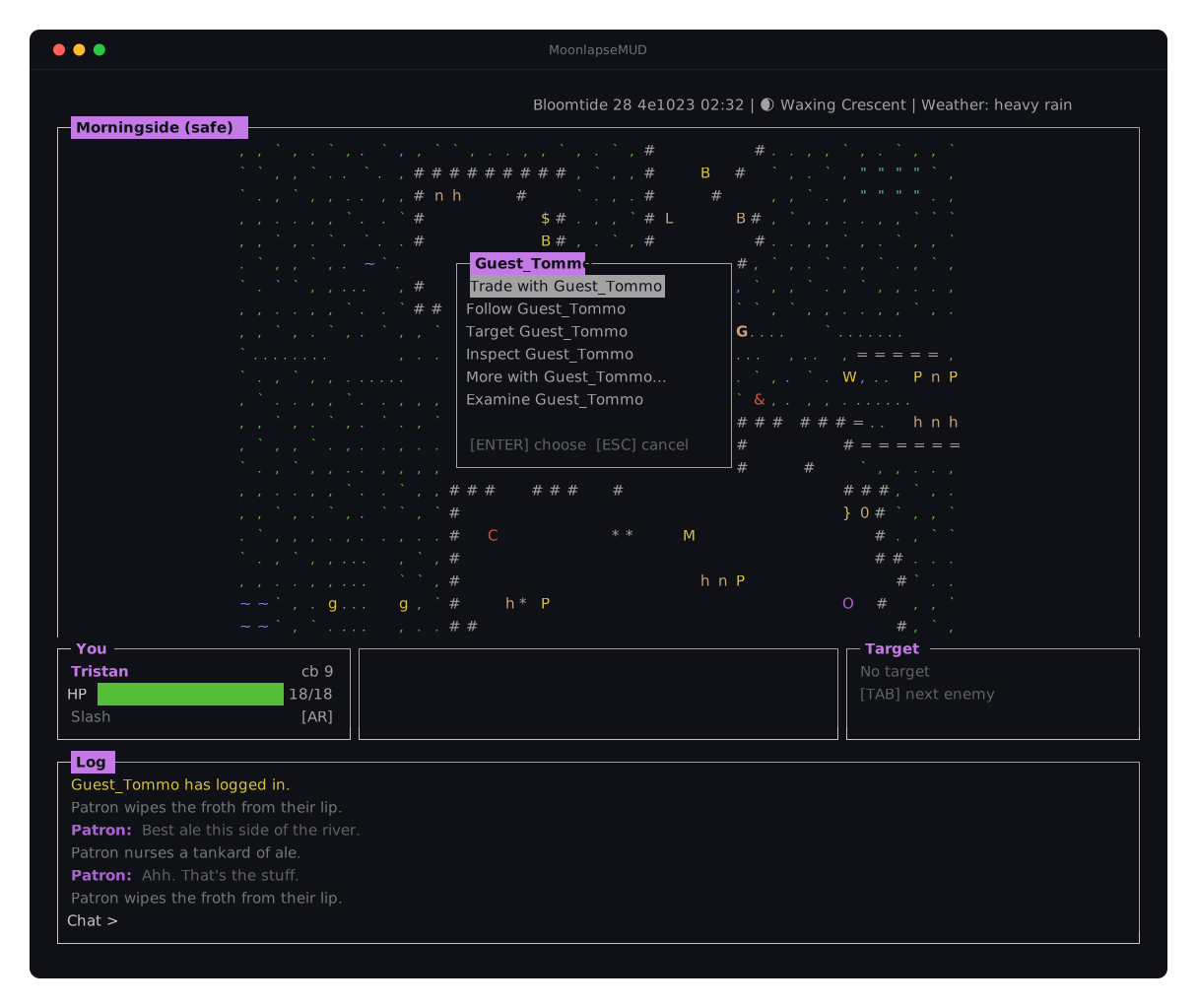
Choose a player in the Social window, in the nearby list (K), or on the map (k, then “More with Bob…”), and you get one menu with everything you can do with them: whisper to them, invite them to your party, add them as a friend, ignore them, or report them.
Ignoring a player
If someone’s bothering you, /ignore <name> and you won’t hear from them again. Their chat, /me, whispers, party chat, party invites, trade requests and letters are all hidden from you, from every character they have, not just the one you named. /unignore <name> undoes it.
- They’re never told. As far as they can tell, everything they send still goes through.
- A letter from someone you ignore is lost, along with anything attached to it.
- You can’t ignore the staff, so the moderators can always reach you.
- Someone can’t be on your friends list and your ignore list at once:
/unfriendthem first.
Reporting a player
Reporting now opens a window. Type /report, or /report <name> to fill in the name, or choose Report from a player’s menu. Then say what it’s about, from a list (advertising websites, scamming, seriously offensive language, macroing or use of bots, and so on), and add a message if you want to. “Other” needs a message.
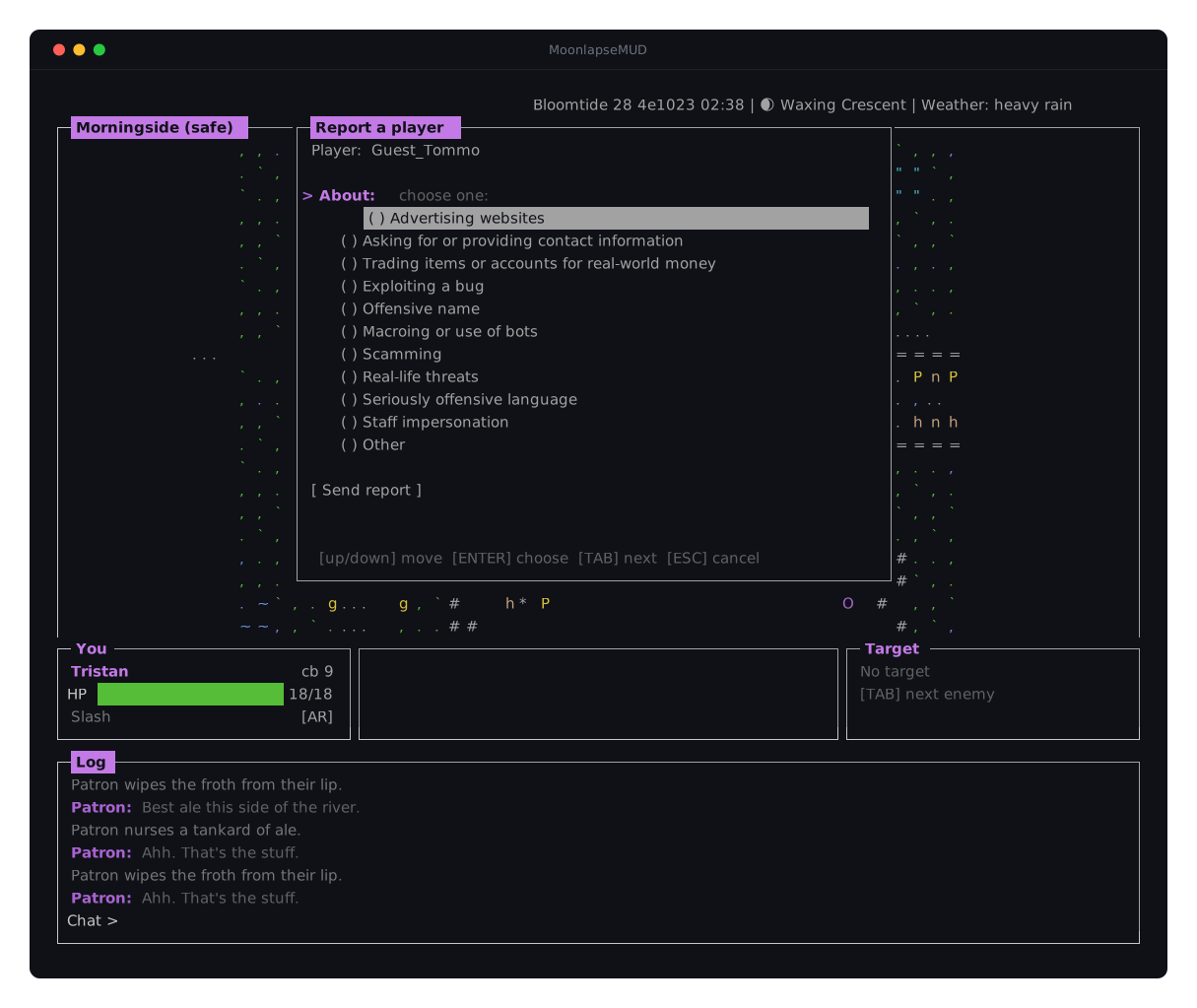
As before, the moderators also get what that player said to you or near you in the last five minutes, so you don’t need screenshots, and the player is never told who reported them.
If the moderators act on your report, you’ll hear about it. A thank-you arrives in your notifications (N). For your privacy and theirs, it doesn’t say who or what was done. If the report didn’t need action, you won’t get anything. The thank-you is for your account, so it reaches whichever of your characters you play next.
You can make 5 reports an hour (guests, 2), and report the same player once every 10 minutes.
The help window, and /help
The help window (?) has every key in the game, by topic. This release adds a topic for ignoring and reporting, and /me under chat. And it’s now where you find your commands too: press TAB in it to switch between the keys and the commands you can use.
![The help window over the map, with its topics down the left (Moving & looking, which is selected, Fighting, Magic, Party, Items & making, Chat & commands, Friends & players, Ignore & report, Windows & log) and that topic's keys on the right, above a footer of [UP/DOWN] topic, [TAB] commands and [?] or [ESC] close.](/images/screenshots/help-commands.svg)
/help used to be one long list, and at most window sizes you had to scroll back through the log to read it. Now it opens in the help window too, with your commands sorted into categories:
/helplists the categories and the commands in each./help <category>, like/help chator/help social, says what each command in it does./help <command>, like/help whisper, explains one in full.
Taking everything at once
When there’s more than one thing to pick up (g on a pile, or next to a table), the list now has take all: press a and you pick up everything in it. ENTER still takes one thing. Anything that doesn’t fit in your pack stays where it was.
![The Choose Item list over the game, listing a few items on the ground, with a footer showing [ENTER] take, [a] take all and [g] close.](/images/screenshots/take-all.svg)
Small changes
- A lot of the game’s text has been rewritten, by hand: messages, screens, the help, and the descriptions of items, objects, monsters and spells. Along the way, the guardsman worked out that he protects the Duke, not a king Morningside doesn’t have.
/coords,/bankboxand/mailboxare no longer in the help. They were only ever there for testing.- The browser version has an icon in its tab.
- Moderators get a daily reminder of any report that’s still waiting, so nothing sits unanswered.
Updating
Version 0.6.0 no longer connects, and the game will ask you to update. Download 0.7.0 from the download page and replace your old folder, copying across guest.toml if you play as a guest. The browser version is already up to date.
Thanks for playing. Come and say hello on Discord.