Your first few minutes
- Download the client, unpack it and run it. Or skip the download and play in your browser at play.moonlapse.net.
- On the title screen, choose Sign in. Your browser opens at the sign-in page; if it doesn’t, the screen shows the address to go to and a code to enter. (In the browser version, you go straight to the sign-in page.) Sign in, or make an account with an email, Google or Discord, then come back to the game. Tick Stay signed in first and next time you can go straight in with Continue as your email address. Or choose Play as guest to start without an account: see playing as a guest. The first time you play, and whenever the terms of use change, the game shows them before anything else: read to the end with the arrow keys or PgDn, then Accept. Decline (or Esc) takes you back to the title screen, and you’re asked again next time.
- Next is the character screen, with your characters, the one you played last at the top. Press N to make one and give it a name, then Enter to play it. D deletes a character, and Esc goes back to the title screen. More on your characters below.
- You start in front of the Morningside Inn. You’re the
@. Walk with the arrow keys. - Press Enter to do whatever’s on offer where you’re standing (talk, open, fish, pick up…). k looks around with a cursor, and K lists everything nearby.
- Press ? at any time for the in-game help: every key below, sorted by topic.
Playing in the browser
At play.moonlapse.net it’s the same game, with the same keys, on a desktop or laptop with a keyboard. The game uses no keys your browser keeps for itself. If keys stop reaching it, click on the game to give it focus.
Reading the screen
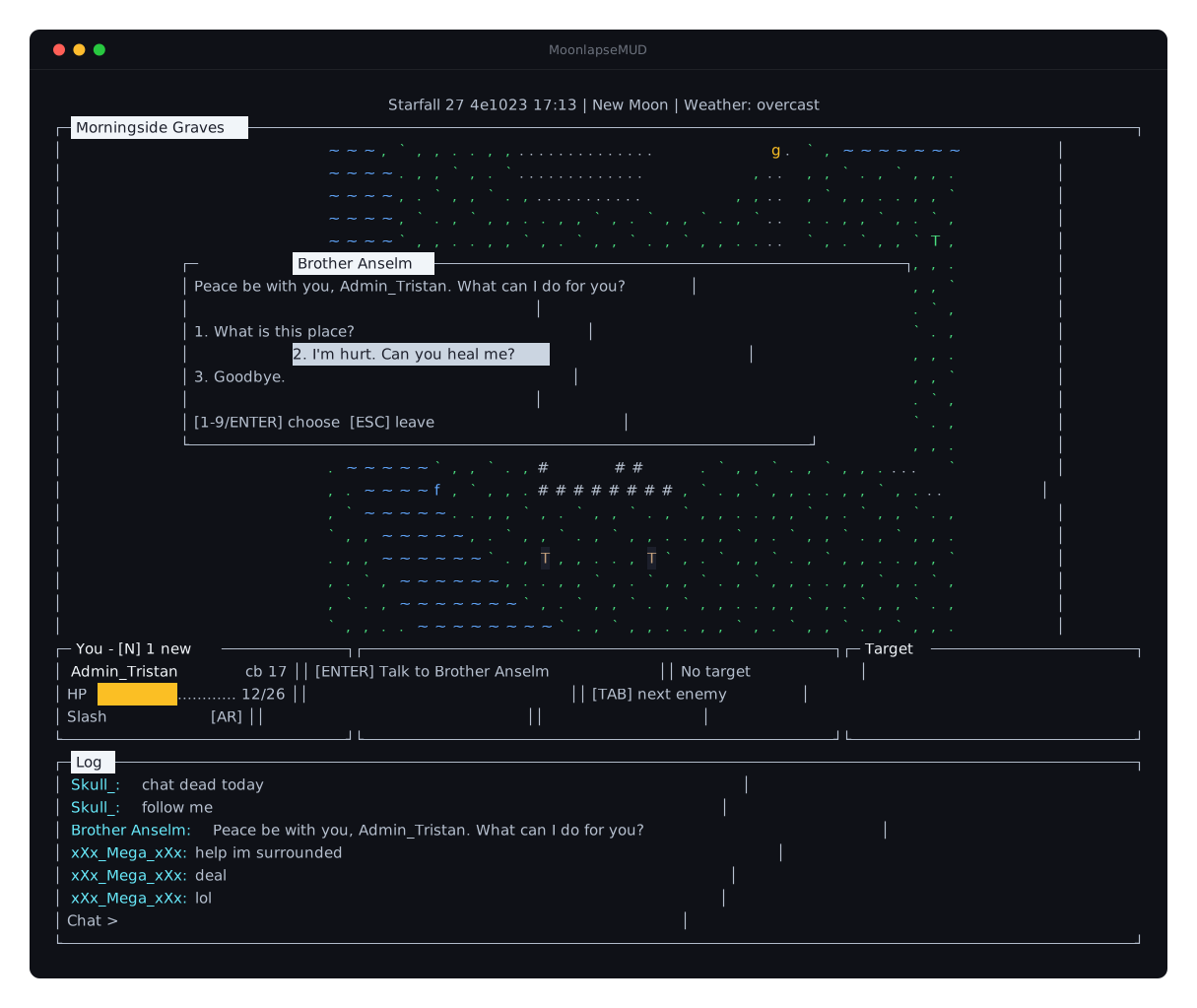
The big frame is the world. Its title is the name of the place you’re in, with a red PvP if other players can attack you there, or (safe) where nobody can. Above it are the date, the phase of the moon and the weather.
Below the world are three panels: You (your health, combat level and attack style), what you can do here, and your Target. Under those is the log, where chat and everything that happens to you shows up.
A few things you’ll see on the map:
@ | you |
| Capital letters | other players and the people of Midland, by the first letter of their name |
| Lowercase letters | monsters, the same way: g for a goblin |
, . ` | grass |
~ | water |
# | walls |
T o f | a tree to chop, a rock to mine, a fishing spot |
* | something on the ground |
$ & | a bank box, a mailbox |
O | a way through to somewhere else |
Not sure what something is? Press k, move the cursor onto it and see.
Controls
Moving and looking
| Key | |
|---|---|
| ↑ ↓ ← → | walk |
| Enter | do what’s here: talk, gather, open… |
| g | pick up what you’re standing on |
| k | look around with a cursor: then Enter for what you can do there, w to walk there, Esc to stop |
| K | everything nearby, as a list |
| m | the map: arrows pan, + - zoom, c back to you, l place names on/off |
| w | walk to your target |
| W | follow your target |
Fighting
| Key | |
|---|---|
| Tab | target the nearest enemy (again for the next one) |
| Shift+Tab | the previous one |
| a | attack your target (you’ll walk over) |
| Esc | stop targeting |
| r | auto-retaliate on/off |
| x X | next / previous attack style |
| e | equipment: your bonuses and your threat |
| S | status effects |
Monsters go after whoever’s the biggest threat to them. A defensive style, a shield and heavy armour keep their attention on you, so your friends can hit them from behind.
Magic
| Key | |
|---|---|
| p | spellbook: cast a spell, or choose the one your staff or wand casts by itself |
| c | autocast on/off |
Attack spells go at your target. Mend heals a party member you’ve targeted, or else you. To use Telegrab, look at an item with k.
Items and skills
| Key | |
|---|---|
| i | inventory: equip, eat, drop |
| e | equipment: take things off, or put them on |
| C | create: smithing, cooking, fletching… |
| s | skills |
| T | trade with a player |
Chat and commands
| Key | |
|---|---|
| t | chat |
| / | type a command |
| ↑ ↓ | your earlier messages |
| Command | |
|---|---|
/w <player> <message> | whisper to someone, wherever they are |
/r <message> | reply to the last whisper |
/who | who’s playing, and where |
/friend <player> | add someone to your friends list (/unfriend to take them off) |
/ignore <player> | stop seeing anything they say or send you (/unignore to undo) |
/coords | where you’re standing |
/bankbox | look in your bank from anywhere |
/mailbox | read your letters from anywhere |
/report [player] | report a player to the moderators |
/help | every command |
Someone spamming, harassing you or cheating? /report them, or choose Report from their menu. Pick what it’s about and add a message if you like. The moderators see that and what that player said to you or near you in the last five minutes, and the player is never told who reported them. If the moderators act on your report, you’ll get a thank-you in your notifications. For anything else, find us on Discord.
Windows and the log
| Key | |
|---|---|
| j | quest journal |
| N | notifications |
| F | friends, who’s playing, who you’ve heard lately, and who you ignore |
| L | which log channels to show |
| + - | scroll the log (PgUp PgDn a page at a time, End back to the latest) |
| ? | help |
| Esc | close a window |
| Q | log out |
Playing together
Look at another player (k), or find them in the nearby list (K) or the friends window (F), for a menu of everything you can do with them: whisper, invite them to your party, add them as a friend, ignore or report them. Or type /invite <player>. Answer an invite from your notifications (N). A party is up to four players. Members near a kill share its XP, its loot and its quest credit, and you can see how everyone’s doing wherever they are.
| 1 2 3 | target a party member |
/p <message> | party chat |
/leave | leave your party |
/kick <player> | remove a member (if you lead) |
To trade, target a player and press T. Both of you see the offer and both have to accept it.
Your characters
An account can have up to 10 characters. Only one of them can be in the game at a time. They share nothing, not even a bank: to move items from one to another, mail them.
A name is letters, digits and underscores, and it’s yours alone whatever its capitals: if there’s a Bob, there can’t be a bob. A name can never be changed.
Your characters are on the hiscores: their levels, XP and ranks, for anyone to see. Type /hiscores off to take the character you’re playing off them, and /hiscores on to put it back.
To delete a character, select it on the character screen, press D and type its name. It stays on the list, greyed out, with the days it has left: for 30 days you can select it and press Enter to Restore it. A deleted character doesn’t count towards the 10, but restoring one needs a free slot, and its name stays taken until it’s gone, even for you. After 30 days, or straight away if you choose Delete now, it’s deleted for good, with its items, bank, quests and mail, and the letters it sent.
Playing as a guest
Play as guest on the title screen starts you straight away, with no account and no email address. A guest has one character, called Guest_ and the name you choose: Guest_Bob. Next time, Continue as Guest_Bob brings you back to it.
A guest can do almost everything, but it can’t trade with other players, fight them, or send or receive items by mail (letters are fine). Its skills stop at level 10, and XP past that is lost, not saved for later. Its chat is limited a little more than everyone else’s.
To keep your guest, select it on the character screen and press R to register: sign in, or make an account, in your browser as usual. The character joins your account under a new name without the Guest_, keeps everything it had, and the limits are gone. Registering offers the name you first chose; if someone else has it by then, you’ll be asked to pick another. For a week, whispers to the old name still reach it.
A guest nobody plays for 7 days is deleted, with everything it had. Your way back to it is kept on your computer, in guest.toml next to the client, or in your browser for the browser version: delete the file or clear the browser’s data and the guest is lost for good.
Tips
- Talk to everyone. Quests start in conversation. Your journal (j) keeps track of where you’re up to.
- Monsters drop junk. Cracked teeth, matted fur and goblin trinkets are only good for selling. Shops buy them, and J in a shop sells all your junk at once.
- Banks and mailboxes are around town. Letters can carry items, and arrive even when the other player is offline.
- Dying sends you back to the chapel in Morningside Graves.
- Logging out takes a moment if you’ve just been fighting: you can’t escape a fight by quitting.